Verify Your Fansly Page
Before we can approve your profile for promotion, we need to get a clear understanding of the full range and quality of content you’re offering on your page.
This helps us make sure we’re promoting you accurately and putting you in front of the right audience, which ultimately means better results for you. It also allows us to give useful feedback and ongoing support to help you earn more.
Don’t worry, this is only viewed internally by our team and is never shared publicly. We just need to know what the content is that you are asking us to promote, before we can recommend it to our site users.
As soon as we’ve had a look, we’ll approve your application get you set up for promotion.
Click Here To Learn How To Generate A Free Trial Link
- Log in to your Fansly creator account
- Cick your profile icon (The small circle in the top right on desktop)
- Go to your Creator Dashboard
- Find the Promotions or Discounts section
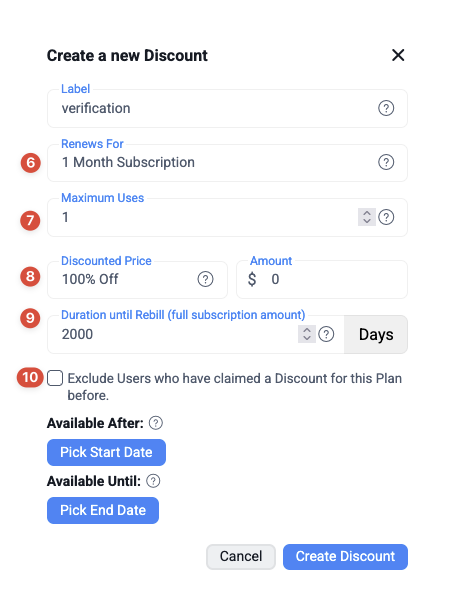
- Click the Create Discount button under the Subscription Discount section
- In the Renews For box, select your top subscription tier
- Set the Maximum Users to 1
- Set the discount to 100%
- Set the duration to 2000 (two thousand) days
- Uncheck the box for “Exclude Users who have claimed a Discount for this Plan before.”
- Leave the other settings unchanged
- Click Create Discount
- Copy the free trial link
- Paste the link in the field below